
Sign PDF Online Free – Fill & Sign PDF Forms
Draw, type or upload your signature and fill out PDF forms. Sign a PDF without printing. Free, no watermark, no signup.
or drop a PDF here
or start with a blank document
Private and short-lived: every upload is erased automatically 72 hours after you last open it.
Step-by-step guide
Fill and Sign a PDF: step by step
Draw, type or upload your signature and fill out PDF forms. Sign a PDF without printing. Free, no watermark, no signup.
-
1
Upload and fill the fields
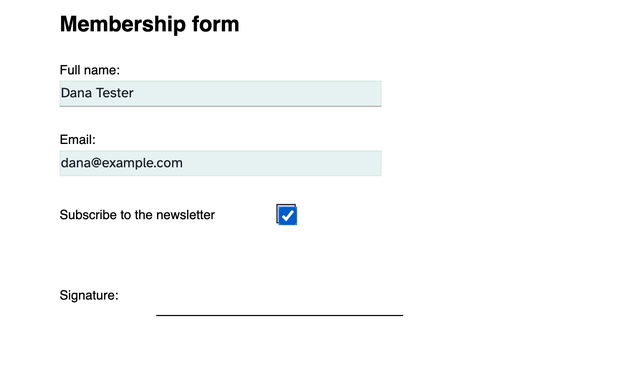
Choose a file above. Its form fields light up on the page — click a box and type, tick the checkboxes, pick from the dropdowns. No fields in the PDF? The Forms menu adds them, and Text writes anywhere on the page.
-
2
Add your signature
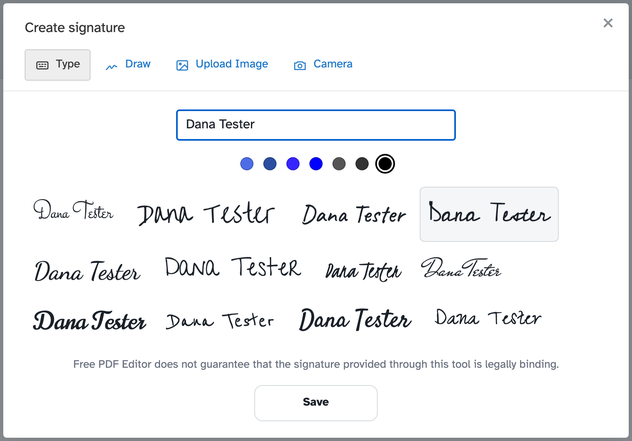
Open Sign and press New Signature: type your name and pick one of twelve handwriting styles (with seven ink colours), or draw it with the mouse, upload a photo of it, or take one with the camera. Save puts it in your gallery for next time.
-
3
Place it, then save
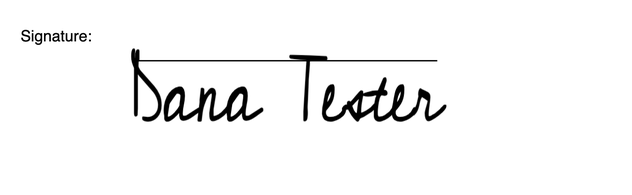
Click on the page to drop the signature, then move, resize or rotate it like anything else. Save keeps the draft; Save and Continue bakes everything in and opens the ready page to download, share or print.

Legal stamp paper
Start from your stamp paper — one sheet: take a photo or scan, use the e-stamp PDF from the portal, or print our template.
- Your stamp paper — the side carrying the stamp: a purchased e-stamp PDF, or a clear photo or scan. A stamp paper is one sheet — no back page.
A photo opens the scan room first (crop + effects), so the paper comes out straight and clean.
Upload your stamp paper
A photo opens the scan room — drag the corners, pick an effect, then “Use this”.
Dummy page
Pages you add later (Insert page) use this size and colour — the stamp paper keeps its own.
Files added here are embedded inside the PDF. Readers open them from their attachments pane.
Every applied change for this document, newest first.
Create signature
Use a photo or scan of your signature on a plain background.
Sign on paper, then hold it up to the camera.
Rifinit does not guarantee that the signature provided through this tool is legally binding.
Add image
Publish for others to fill & sign
Share this link — it opens the Fill & Sign editor with your form ready to fill. The file is kept for two hours, like every upload; after that, publish again for a fresh link.
Blank page
Prepare your scan
Check the crop over your paper — drag a corner to adjust it, then choose an effect.
Finding the paper edges…
Create stamp
Link properties
Where should this open?
Tab order — Form fields
Custom order — drag and drop below to reorder.
Fonts
Keyboard shortcuts
Toolbar guide
Every button in this editor — what it is and how to use it. The list is read off the toolbar you actually have, so it matches this page.
Edit existing text
Finds this text in the PDF and replaces it. Works on text-based PDFs; scans (images) cannot be edited.
Send feedback
Tell the team what worked, what broke, or what you want next. Photos of the screen help more than anything else.
More tool information
What the other tools do
Create Forms
Turns a flat PDF into a fillable form: text fields, multiline boxes, dropdowns, checkboxes, radio groups and signature fields, placed exactly where the printed form expects them.
BETAE-Sign
Sends a PDF out for signature and collects the results in order: named signers, the fields each one must complete, and a sealed copy with a completion certificate when everyone has signed. It is one of the two account-only products.
Edit PDF
The full editing workspace: retype existing text in place, add text, images, stamps, shapes, whiteout and signatures, draw highlights and freehand marks, and place links or form fields. Editing an existing line keeps its font, size and colour instead of replacing it with a lookalike.
Extract Pages
Produces a new PDF containing only the pages you choose, either by typing a range or by tapping thumbnails. Bookmarks that point at the kept pages travel with the extract.
Keep reading
Related Blog Posts
- How-to How to Sign a PDF Without Printing It Fill form fields, create a reusable signature and sign any PDF in your browser — no print-scan dance and no subscription.
- How-to How to Edit Text in a PDF (Without Rebuilding the File) Why PDFs resist editing, the three honest ways around it, and when converting to Word beats editing in place.