
Resize PDF Pages – Change Page Size Online Free
Change PDF page size to A4, Letter, A3 or custom and add margins or padding. Free online resizer, no watermark.
or drop a PDF here
No file selected
Private and short-lived: every upload is erased automatically 72 hours after you last open it.
Step by step
Resize a PDF: step by step
Change PDF page size to A4, Letter, A3 or custom and add margins or padding. Free online resizer, no watermark.
-
1
Upload and pick the mode
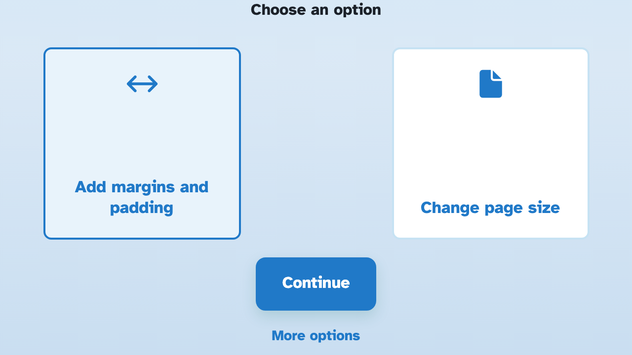
Drop in a document and choose: Add margins and padding widens the sheet around its content, Change page size puts every page on new paper, and More options reveals Reduce the file size. Files are deleted after 2 hours.
-
2
Set the margins or the paper
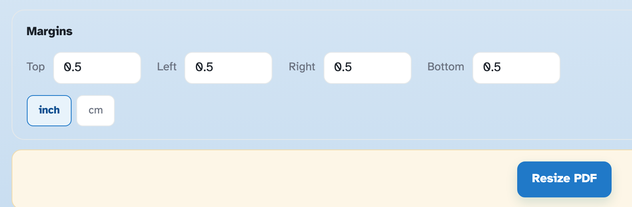
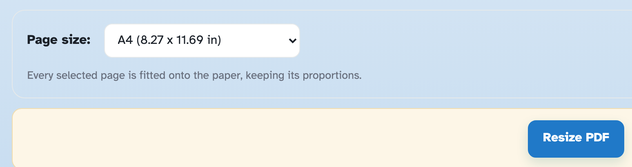
For margins, type Top / Left / Right / Bottom in inches or cm — half an inch on every side turns 8.27 × 11.69 in into 9.27 × 12.69 in. For a new paper size, pick a preset from A1 down to Executive or type a custom width and height — every page is fitted keeping its proportions.
-
3
Check the sizes and run
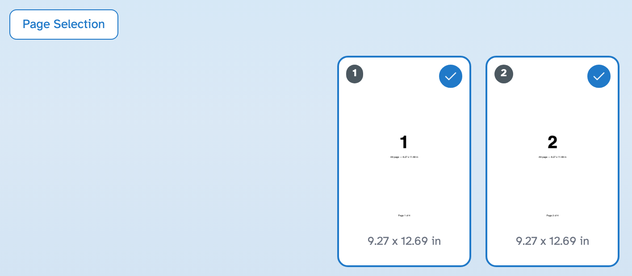
The size under every page updates as you type, so the outcome is visible before you commit. Pick pages with Page Selection (Select All / Odd / Even / Deselect All) if only some should change, then press Resize PDF.
-
Margins that breathe
Half an inch on each side grows A4 from 8.27 × 11.69 to 9.27 × 12.69 in.
-
Any paper size
A1 to Executive presets or a custom width and height — fitted, proportions kept.
-
inch or cm
The unit switch converts the margins — type in whichever you think in.
-
See it before you run
The size under every page updates as you type — the new dimensions are the plan.
-
All, odd, even — or picked pages
Page Selection limits the change to the pages you chose; the rest stay as they are.
-
Private by default
No account, no watermark — and every file is automatically deleted after 2 hours.
Selected:
Choose an option
Choose an option
Margins
Every selected page is fitted onto the paper, keeping its proportions.
Filenames (0):