
JPG to PDF Converter – Convert Images to PDF Free
Combine JPG, PNG and other images into one PDF. Reorder, rotate and download. Free online converter, no watermark.
or drop images here
No files selected
Private and short-lived: every upload is erased automatically 72 hours after you last open it.
Step by step
Convert JPG to PDF: step by step
Combine JPG, PNG and other images into one PDF. Reorder, rotate and download. Free online converter, no watermark.
-
1
Upload your images
Choose images or drop them in — JPG, PNG and friends. Each one lands on the sheet as a page, with a zoom slider to size the previews, and Add More Files tops the stack up anytime. Files are deleted after 2 hours.

-
2
Set the page & fit
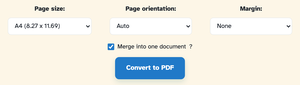
Page size runs A4 by default — or Letter, A3 and friends, or Fit to image so the sheet hugs the picture. Orientation Auto follows each image, and margins come in None, small or large. Merge into one document stays on; switch it off and every image downloads as a PDF of its own.
-
3
Convert & download
Press Convert to PDF. In our test the two pictures came back as j2p-1.pdf — a two-page A4 document, one image per page, download one click away.

-
Every image a page
Pictures land on their own sheet of the one document.
-
Page size your way
A4, Letter, A1… or Fit to image so the sheet hugs the picture.
-
Orientation Auto
Portrait, landscape — or automatic per picture.
-
Add more anytime
Add More Files stacks further pictures into the same PDF.
-
Merge — or don't
Switch Merge off and every image downloads as its own PDF.
-
Private by default
No account, no watermark — and every file is automatically deleted after 2 hours.